
Electronic signature continues to evolve towards contracting that is quicker, more accessible and more secure. Click & Sign and Openum now support RCS electronic signature, a channel that delivers signature requests and registered notifications directly to the recipient’s messaging app from a verified sender and is backed by each service’s legal guarantees.
Table of contents
RCS comes to electronic signature
RCS (Rich Communication Services) gives business messaging a more visual, interactive format: a verified sender (validated through a Google-backed process), brand identity and custom buttons. Messages are sent over Wi-Fi or mobile data at no extra cost and, on compatible devices, land in the phone’s usual SMS inbox, so there’s no additional messaging app to install.
Bringing RCS to Click & Sign and Openum meets a specific need: making communications more trustworthy by verifying who sends them. Recipients also get messages directly in their phone’s messaging app, a more direct experience that fits how they handle their paperwork online. RCS messages in Click & Sign and Openum can be sent as standard or registered.
RCS electronic signature is a further sign of Lleida.net’s commitment to continually evolving its services and improving the customer experience.
Want to know more about the technology? Find out what RCS is and how it works
How RCS electronic signature works with Click & Sign
Click & Sign is Lleida.net’s platform for managing electronic signature processes, whether simple, advanced or qualified. With RCS electronic signature, businesses gain a new channel for getting signature requests to recipients, alongside SMS, email and WhatsApp.
Here’s how RCS electronic signature works on a mobile phone:
- Send the document. The company starts the signature process in Click & Sign and picks RCS as the channel. This can be done manually on the platform or automatically via the API.
- The signer receives an RCS message. The request arrives as an RCS message showing the sender’s verified brand identity.
- Open the document. The recipient taps the button or link in the message to open and review the document.
- Sign. The signer completes the process using the configured signature method, in accordance with the selected identification and authentication requirements.
- Get the signed copy. Once finished, the signer can access the signed documents and download the documentary evidence
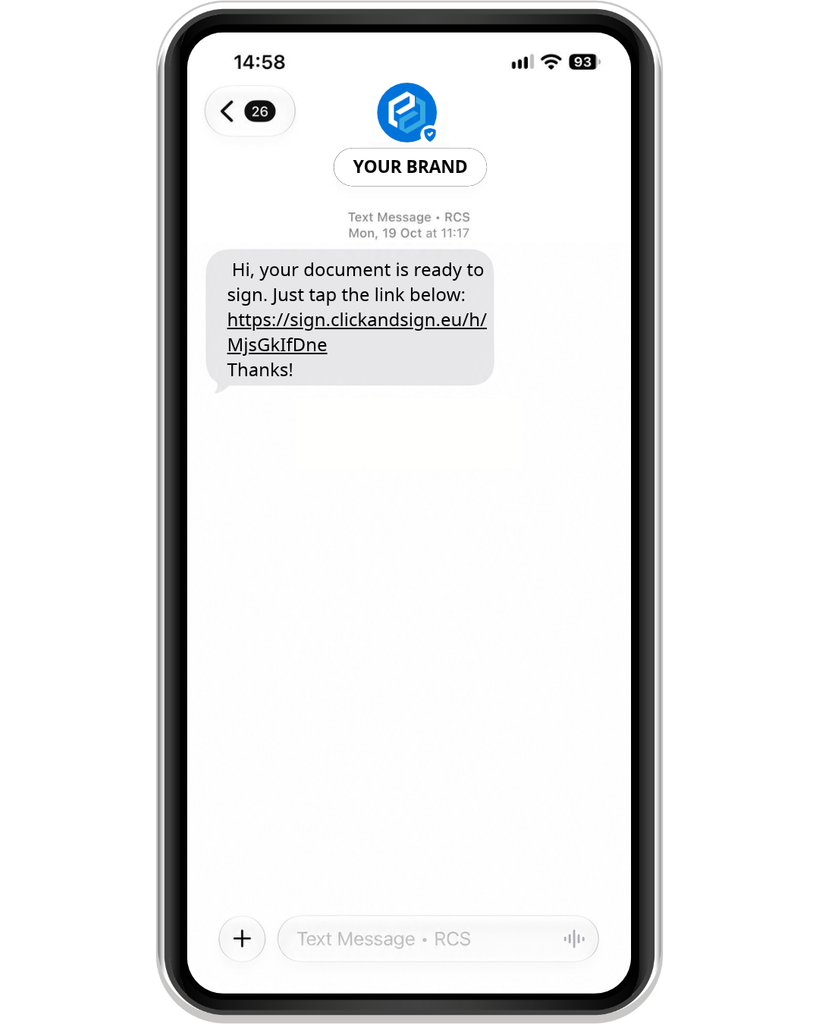
RCS electronic signature makes it possible to sign any contract or agreement online on a phone, with no paper changing hands, making remote contracting easier to manage.
Click & Sign can also be configured with different signature methods, ranging from simple to advanced, including qualified electronic signatures. Which one to use depends on the process’s needs, the required level of security, and the configuration in place.
Is an RCS electronic signature an advanced electronic signature?
Whether an electronic signature is legally valid doesn’t depend solely on the channel used to send the request. It also depends on how the signer is identified, how the signature is linked to the signed document and the safeguards the process provides.
Regulation (EU) No 910/2014, better known as eIDAS and amended by Regulation (EU) 2024/1183, sets out the requirements for an advanced electronic signature in Article 26. To be considered advanced, a signature must meet four conditions.
Uniquely linked to the signer
The signature request is sent to the recipient’s phone number, linking the request to that specific signature process. That said, receiving a link on a phone doesn’t, on its own, prove who is signing, so the additional safeguards in the process also need to be considered.
Capable of identifying the signer
The signature process can include identification data and verification mechanisms to establish who signs the document. The level of assurance depends on the identification and authentication methods used in each case.
Created using data under the signer’s sole control
The signer completes the process on their own mobile device. To meet this requirement, however, the procedure must provide sufficient assurance that the signature creation data are under the signer’s sole control; using a personal device alone is not enough.
Able to detect any subsequent changes
The signed document includes sealing mechanisms and electronic evidence to verify its integrity and detect any subsequent modifications. This evidence also records how the signature process was carried out.
What does this mean for RCS electronic signature?
RCS is the communication channel used to deliver the signature request to the recipient. How the signature is classified in legal terms depends on the mechanisms used during the process and on whether the applicable requirements are met.
In other words, an RCS electronic signature via Click & Sign can be part of an advanced electronic signature process, provided the configuration used meets the conditions set out in Article 26 of eIDAS.
Registered notifications by RCS with Openum
RCS electronic signature is just the start: the channel also opens up new options for sending certified business communications through Openum.
Openum certifies access to the content of the electronic communications you send. With RCS, the notice reaches the recipient through a certified channel that combines a verified brand identity with a more visual presentation.
This is particularly useful for organisations that need to share important information and keep electronic evidence of the process. Use cases for certified RCS with Openum include:
- Legal requests and communications, making it easier for recipients to access important information.
- Contractual communications, ensuring notices about contracts, agreements or service terms are delivered.
- Customer notices, to keep customers informed about procedures, formalities or the services they have signed up for.
Why sign by RCS rather than SMS?
RCS electronic signature opens up new ways to present and deliver a signature request. The idea isn’t necessarily to replace SMS, but to have another channel that suits each process and each recipient.
Benefits of RCS electronic signature:
- Verified sender and brand identity. Messages display the company’s name and visual identity, which are verified beforehand through a Google-backed process. Recipients can easily recognise who is contacting them, which builds trust and helps reduce the risk of impersonation, smishing and phishing, keeping message security high. It also helps improve open rates.
- Sent over Wi-Fi or mobile data, with no extra connection costs. RCS messages travel over the device’s internet connection, either Wi-Fi or mobile data, at no additional cost.
- Accessible from the phone’s usual messaging app. Messages land in the native messaging inbox of compatible devices, right where users already get their SMS, with no extra apps to install.
RCS and SMS can complement each other within a company’s communications. Which channel is available depends on device compatibility, service coverage, and how sending is configured.
To learn more about each technology, see the differences between RCS and SMS
Use cases by sector: where can RCS electronic signature be used?
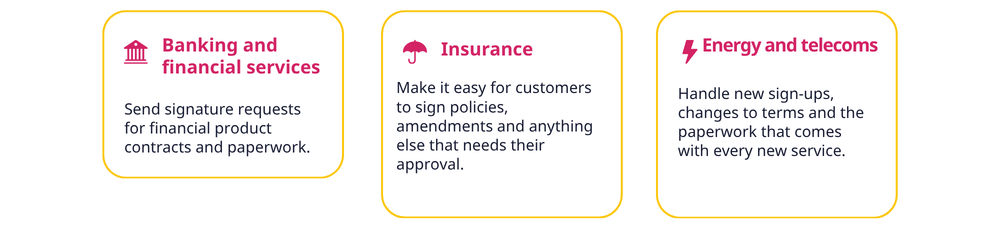
RCS electronic signature can be useful in a range of sectors where speeding up contracting and making documents easy to access matters.

With RCS now in Click & Sign and Openum, digital communications can do more. Businesses can bring signature requests and notifications closer to their customers through a visual, interactive channel, with a verified brand identity and signature and certification mechanisms tailored to each need.
How legally valid is an RCS electronic signature?
Using RCS as the delivery channel doesn’t in itself determine whether an electronic signature is legally valid. That depends on the safeguards built into the procedure and the type of signature configured.
With Click & Sign, signature processes are aligned with the eIDAS Regulation, which recognises the legal effects of electronic signatures and sets out three levels of electronic signature, each with its own requirements, security guarantees and legal effects.
What if the recipient’s phone doesn’t support RCS?
Compatibility depends on the device, the mobile operator and service availability. If the recipient can’t receive RCS, Click & Sign and Openum can also send the signature flow by SMS, email or WhatsApp.
Does the signer need to download an app?
No. With RCS electronic signature, requests arrive directly in the phone’s native messaging app, in the same inbox where SMS usually lands, so the signer doesn’t need to install anything.
What evidence does an RCS electronic signature generate?
Both Click & Sign and Openum generate electronic documentary evidence proving that the communication was sent, that it was delivered to the recipient, and whether its contents were accessed. With Click & Sign, the document’s electronic signature is also recorded. All this evidence is time-stamped and electronically signed, guaranteeing its integrity and traceability.
Can I use RCS in Click & Sign and Openum with my existing Lleida.net account?
Yes, although the RCS channel needs to be activated in your account first. If you’re already a customer and want to enable the service, get in touch here